
Banner Ad Sizes: Complete Guide to Standard Dimensions
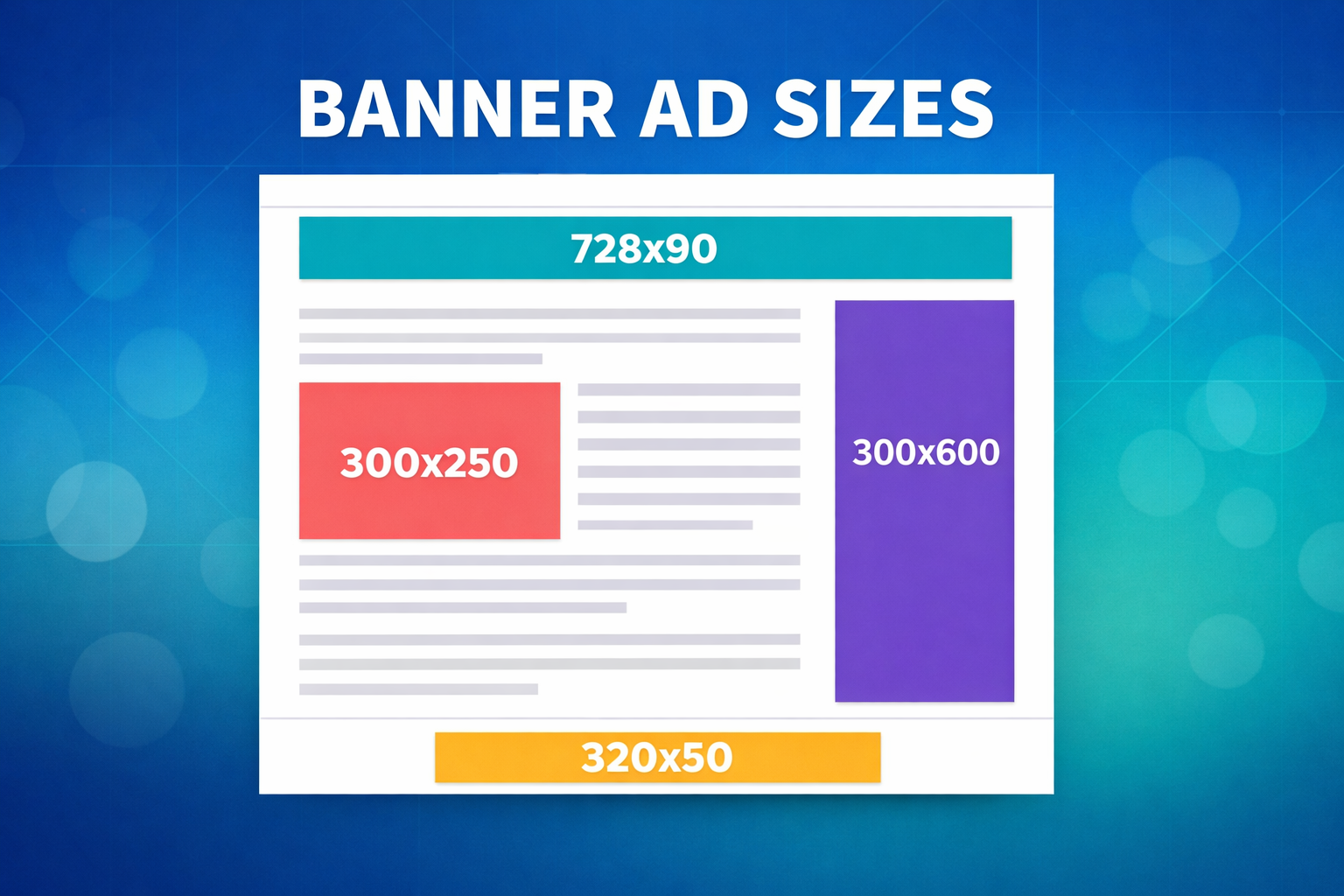
Choosing the right banner ad sizes is one of the most impactful decisions a publisher can make. The dimensions of your ad units directly affect how many advertisers compete for your inventory, how much they are willing to pay, and how users interact with your pages.
This guide covers every standard banner ad size that publishers need to know – from the IAB-defined standards to the Google-recommended dimensions that attract the most demand. We will walk through desktop sizes, mobile sizes, responsive options, and practical advice on which sizes to prioritize for maximum revenue.
What Are Banner Ad Sizes?
Banner ad sizes are the standardized width-by-height dimensions (measured in pixels) used for display advertising on the web. These standards exist so that advertisers can create a single set of ad creatives that work across thousands of different websites.
The Interactive Advertising Bureau (IAB) maintains the official standards for ad unit sizes. Google Ads and Google Ad Manager support these standards and recommend a specific subset of sizes that attract the highest demand and deliver the best performance.
For publishers, using standard ad sizes is essential. Non-standard dimensions dramatically reduce the pool of advertisers bidding on your inventory, which lowers CPM rates and overall revenue. The more widely supported a size is, the more competition there will be in the auction – and more competition means higher prices.
Standard Desktop Banner Ad Sizes
These are the most common banner ad sizes used on desktop websites. Each size is suited to specific page locations and content layouts.
Top-Performing Desktop Sizes
| Size (px) | Name | Typical Placement | Demand Level |
|---|---|---|---|
| 300×250 | Medium Rectangle | In-content, sidebar | Very High |
| 728×90 | Leaderboard | Top of page, between content | Very High |
| 970×250 | Billboard | Top of page | High |
| 300×600 | Half Page (Large Skyscraper) | Sidebar | High |
| 160×600 | Wide Skyscraper | Sidebar | Medium |
| 336×280 | Large Rectangle | In-content, sidebar | Medium |
| 970×90 | Large Leaderboard | Top of page | Medium |
| 468×60 | Banner | Top of page, in-content | Low |
| 120×600 | Skyscraper | Sidebar | Low |
300×250 – Medium Rectangle
The 300×250 is the single most popular banner ad size in digital advertising. Virtually every advertiser creates creatives in this dimension, which means it consistently attracts the highest number of bids and the strongest CPM rates.
Its versatility is unmatched: the 300×250 works in sidebars, embedded within article content, and as a component of larger multi-size ad units. If you can only run one ad size on your site, this should be it.
728×90 – Leaderboard
The leaderboard is the standard horizontal banner placed at the top of a page, typically above or below the site header. Its wide format makes it immediately visible as a page loads, giving it strong above-the-fold exposure.
This size has been an industry staple for decades and remains one of the most supported dimensions across ad networks and ad exchanges. It is commonly used alongside the 970×250 billboard in multi-size ad requests, allowing the auction to select whichever size yields the highest bid.
970×250 – Billboard
The billboard is a large, high-impact unit that dominates the top of the page. It attracts premium brand advertisers who are willing to pay higher CPMs for the extra real estate. Because it accommodates rich media and video creatives, it tends to outperform the standard 728×90 leaderboard on revenue per impression.
The tradeoff is that not every page layout can accommodate a 970px-wide unit. Publishers with narrow content areas may need to use the 728×90 or 970×90 instead.
300×600 – Half Page
Also called the Large Skyscraper, the 300×600 is a tall sidebar unit that offers significantly more creative space than the 300×250. Its size makes it ideal for visually rich ads and often commands higher CPMs than smaller sidebar units.
The 300×600 performs especially well as a sticky ad unit that follows users as they scroll. This increases viewability and keeps the ad in front of readers for longer, which advertisers value highly.
160×600 – Wide Skyscraper
The wide skyscraper is a narrower sidebar option for sites where a 300px-wide column is not available. It has less advertiser demand than the 300×600 but remains a standard IAB size with reasonable fill rates. Consider using the 300×600 when your layout permits, as it generates higher revenue.
Standard Mobile Banner Ad Sizes
Mobile traffic now accounts for the majority of web visits for most publishers. Mobile banner ad sizes are designed for smaller screens and touch-based interaction.
| Size (px) | Name | Typical Placement | Demand Level |
|---|---|---|---|
| 320×50 | Mobile Leaderboard | Top or bottom of screen | Very High |
| 320×100 | Large Mobile Banner | Top or bottom of screen | High |
| 300×250 | Medium Rectangle | In-content | Very High |
| 336×280 | Large Rectangle | In-content | Medium |
| 320×480 | Mobile Interstitial | Full-screen overlay | High |
320×50 – Mobile Leaderboard
The 320×50 is the most widely used mobile banner size. It takes up minimal screen space, making it suitable for sticky placements at the top or bottom of the viewport. Nearly every mobile ad campaign includes 320×50 creatives, ensuring strong fill rates and consistent demand.
Because of its small size, individual CPMs are lower than larger formats. However, when used as a sticky unit, the 320×50 delivers high viewability and can be refreshed at regular intervals, making it a steady revenue contributor.
320×100 – Large Mobile Banner
The large mobile banner is twice the height of the 320×50 and offers advertisers more creative space without being overly intrusive. It is commonly used as an alternative to the 320×50 in sticky placements and often achieves higher CPMs due to the larger canvas.
Many publishers configure their mobile sticky units as multi-size, accepting both 320×50 and 320×100. This lets the auction choose whichever size pays more for each impression.
300×250 on Mobile
The 300×250 performs just as well on mobile as on desktop. On mobile, it is typically placed in-content between paragraphs, where it benefits from high viewability and user engagement. The 300×250 is the best-performing in-content ad size on both devices.
320×480 – Mobile Interstitial
Mobile interstitials are full-screen ads that appear between page loads or at natural transition points. They command some of the highest CPMs available on mobile because they guarantee full-screen visibility. However, publishers must follow Google’s guidelines on interstitial frequency and timing to avoid search ranking penalties.
Multi-Size Ad Requests: Maximizing Revenue per Slot
One of the most effective ways to increase ad revenue without adding more ad units is to use multi-size ad requests. Instead of requesting a single fixed size for an ad slot, you configure the slot to accept multiple compatible sizes and let the auction pick the highest-paying option.
Common multi-size combinations include:
- Top of page: 970×250, 970×90, 728×90
- Sidebar: 300×600, 300×250, 160×600
- In-content: 300×250, 336×280
- Mobile sticky: 320×100, 320×50
Multi-size requests increase the number of eligible bids competing in the auction, which directly pushes up CPMs. This is especially effective with ad exchanges and header bidding setups where multiple demand sources compete simultaneously.
Best Banner Ad Sizes by Placement
The best ad size depends on where you place it on your page. Here is a breakdown of recommended sizes for each common placement.
Above the Fold (Top of Page)
Above-the-fold placements are the first ads users see when a page loads. They typically command the highest CPMs on a page.
- Desktop: 970×250 (billboard) or 728×90 (leaderboard)
- Mobile: 320×100 or 320×50 (sticky)
Use the largest size your layout supports. The 970×250 consistently earns more than the 728×90 where both are options.
In-Content (Between Paragraphs)
In-content ads are inserted within the article body, usually after every few paragraphs. They benefit from high viewability because users scroll past them while reading.
- Desktop and Mobile: 300×250 (medium rectangle)
- Desktop alternative: 336×280 (large rectangle)
The 300×250 is the clear winner for in-content placements. Its universal advertiser support means it consistently delivers the highest fill rates and competitive CPMs. On desktop, it can be floated left or right alongside text, or displayed at full width.
Sidebar
Sidebar ads run alongside the main content on desktop layouts. Their performance depends heavily on whether they are static (fixed position) or sticky (scroll with the user).
- Best: 300×600 (half page) – sticky
- Good: 300×250 – sticky or static
- Narrow sidebar: 160×600 (wide skyscraper)
Sticky sidebar ads vastly outperform static ones. A static 300×600 in a sidebar quickly scrolls out of view, but a sticky version stays visible throughout the user’s session, dramatically increasing viewability and revenue.
Sticky (Anchor) Placements
Sticky ads remain fixed to the edge of the viewport as users scroll. They are one of the highest-performing formats because they maintain 100% viewability for their entire display duration.
- Mobile bottom sticky: 320×50 or 320×100
- Desktop bottom sticky: 728×90
- Desktop sidebar sticky: 300×600 or 300×250
Responsive Ad Sizes
Responsive ads automatically adjust their size to fit the available space in the ad container. Instead of specifying a fixed dimension, the ad unit detects the container width and serves an appropriately sized creative.
Google AdSense uses responsive ad units by default, and Google Ad Manager supports responsive ad slots through fluid ad units and multi-size requests.
Benefits of responsive ads:
- Adapt to any screen size without separate mobile and desktop ad units
- Maximize available space on each device
- Reduce layout shift when ads load (improving Core Web Vitals)
Limitations:
- Less control over exactly which size is served
- Some premium campaigns only target fixed sizes
- Harder to predict layout behavior for page design purposes
For most publishers, a hybrid approach works best: use fixed-size ad units for your primary placements (where you know the exact dimensions) and responsive units for secondary placements where flexibility is more valuable than precision.
Ad Size and Viewability: Why It Matters for Revenue
Viewability measures the percentage of ad impressions that are actually seen by users. The IAB standard requires at least 50% of an ad’s pixels to be in the viewport for at least one continuous second for it to count as a viewable impression.
Ad size directly influences viewability in several ways:
- Larger ads take longer to scroll past, increasing time-in-view. A 300×600 stays in the viewport longer than a 300×250 as users scroll.
- Sticky ads achieve near-100% viewability regardless of size, because they remain fixed on screen.
- Above-the-fold placements are more viewable than below-the-fold ones, but in-content ads placed within engaging articles can match or exceed ATF viewability.
Advertisers increasingly buy on a viewable CPM (vCPM) basis, meaning they only pay for impressions that meet the viewability standard. Higher viewability directly translates to higher effective revenue per impression. Publishers who optimize both ad size and placement for viewability see significantly better CPMs across their entire inventory.
Ad Sizes to Avoid
Not all ad sizes are worth implementing. Some older formats have low advertiser demand and take up valuable page space without generating meaningful revenue.
- 468×60 (Banner): A legacy format from the early web. Most advertisers no longer create 468×60 creatives, resulting in low fill rates and poor CPMs.
- 120×600 (Skyscraper): Too narrow to display compelling ad creatives. The 160×600 and 300×600 are better alternatives.
- 120×240 (Vertical Banner): Extremely low demand. Not worth the page real estate.
- Custom non-standard sizes: Any size not in the IAB standard list will have minimal demand. Stick to standard dimensions.
If you currently use any of these sizes, consider replacing them with higher-demand alternatives. Switching a 468×60 to a 728×90, or a 120×600 to a 300×600, can significantly increase revenue from the same ad slot.
How Many Ad Units Should You Run?
There is no universal limit on the number of ads per page, but there are practical guidelines:
- Google’s policy: Google removed its former “three ad units per page” limit in 2016. However, pages must still have more content than ads. Google’s guidelines state that ad placement should not exceed the amount of publisher-provided content.
- User experience: Too many ads slow page load times, increase layout shift, and drive users away. A page with five well-placed ad units will typically outperform one with ten poorly placed units, because viewability and CTR drop sharply when ads are overcrowded.
- Diminishing returns: Each additional ad unit competes with the others for user attention. After a certain point, adding more ads reduces the CPM on existing units while increasing page weight.
A typical well-optimized page runs 3 to 5 ad units: one above-the-fold (leaderboard or sticky), one or two in-content (300×250), one sidebar (300×600 sticky on desktop), and one bottom sticky on mobile. The exact number should be determined by testing, not guessing.
How Clickio Optimizes Ad Sizes and Placements
Getting banner ad sizes right is only part of the equation. The real revenue gains come from continuously testing different size combinations, placements, and formats to find the optimal layout for each page and device type.
Clickio’s monetization platform takes this further with an AI-driven approach to ad optimization:
- Dynamic ad placement: Clickio’s smart in-article format automatically positions ads at optimal points within your content, choosing the best size for each placement based on the available space and device.
- Multi-size optimization: Each ad slot is configured with multiple compatible sizes and the auction selects the highest-paying option in real time.
- 12+ ad formats: Beyond standard banners, Clickio offers sticky ads, interstitials, rewarded ads, native units, and high-viewability header formats – all managed from a single dashboard.
- Smart refresh: Ads are automatically refreshed when in view, generating additional impressions without hurting viewability metrics.
- Lazy loading: Ads load only as they approach the viewport, reducing page weight and improving Core Web Vitals scores.
- Header bidding + Open Bidding: Multiple demand sources compete for every impression through Prebid header bidding, Google Open Bidding, and Google Ad Exchange – all bundled into a single script.
Publishers using Clickio do not need to manually configure ad sizes or placements. The platform handles format selection, sizing, and optimization automatically, with dedicated AdOps specialists available to fine-tune the setup for each site.
Quick Reference: All Standard Banner Ad Sizes
Here is a complete reference table of all standard banner ad sizes, organized by device type.
Desktop Ad Sizes
| Size (px) | Name | Best For |
|---|---|---|
| 970×250 | Billboard | Top of page, brand campaigns |
| 970×90 | Large Leaderboard | Top of page (narrow layouts) |
| 728×90 | Leaderboard | Top of page, between sections |
| 300×600 | Half Page | Sidebar (sticky recommended) |
| 300×250 | Medium Rectangle | In-content, sidebar, everywhere |
| 336×280 | Large Rectangle | In-content |
| 160×600 | Wide Skyscraper | Narrow sidebar |
| 468×60 | Banner | Legacy – consider replacing |
| 120×600 | Skyscraper | Legacy – consider replacing |
Mobile Ad Sizes
| Size (px) | Name | Best For |
|---|---|---|
| 320×50 | Mobile Leaderboard | Sticky top/bottom |
| 320×100 | Large Mobile Banner | Sticky top/bottom |
| 300×250 | Medium Rectangle | In-content |
| 336×280 | Large Rectangle | In-content |
| 320×480 | Mobile Interstitial | Full-screen overlay |
Key Takeaways
Banner ad sizes might seem like a technical detail, but they have a direct impact on how much revenue your site generates. Here are the main points to remember:
- Stick to standard IAB sizes. Non-standard dimensions drastically reduce demand and CPMs.
- The 300×250 is king. It works on every device, in every placement, and has the broadest advertiser support of any ad size.
- Use multi-size ad requests. Let the auction choose the best-paying size for each impression.
- Prioritize viewability. Sticky formats and in-content placements outperform static above-the-fold banners because they keep ads visible longer.
- Optimize for mobile. The 320×50 and 320×100 sticky units, combined with in-content 300x250s, form the core of mobile ad revenue.
- Replace legacy sizes. Swap 468×60 and 120×600 units for higher-demand alternatives.
- Test, don’t guess. The optimal ad layout depends on your specific audience, content, and traffic patterns.
The right combination of ad sizes and placements can increase revenue by 30% or more compared to a default setup. Whether you optimize manually or work with a platform like Clickio that handles it automatically, the effort is well worth it.